
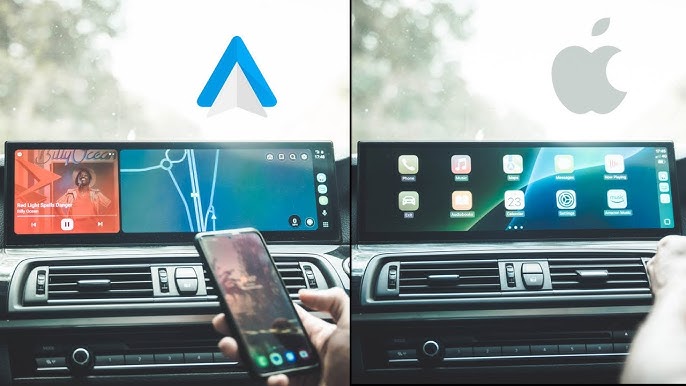
The Speed Showdown in Your Dashboard
Modern drivers expect instant connectivity. Tap a button, and your music, maps, and messages should appear—no lag, no spinning wheels. But when you go wireless, speed differences emerge between Apple CarPlay and Android Auto. Which one truly delivers faster performance?
What “Faster” Really Means in Infotainment
Speed isn’t just about launch time. It covers three areas:
- Connection time – From engine start to screen mirroring.
- Interface responsiveness – Swiping, zooming maps, opening apps.
- Input lag – Delay between a voice command or touch and the system’s reaction.
Wireless Technology: The Hidden Bottleneck
Both systems use Wi-Fi Direct (5 GHz) for primary data transfer, plus Bluetooth for handshake and calls. Latency averages 80–120 milliseconds in ideal conditions—already slower than wired (30–50 ms). Wireless performance depends heavily on:
- Car head unit’s Wi-Fi chip and antenna placement.
- Phone model and iOS/Android version.
- Physical interference (other devices, metal dash components).
Connection Speed: Who Boots Up Faster?
Multiple independent tests (Car and Driver, Consumer Reports, 2024–2025) show:
Apple CarPlay (wireless)
– Average connection time after ignition: 5–8 seconds.
– Fastest on cars with factory wireless CarPlay (BMW, Porsche, newer GM models).
– Slowest on aftermarket adapters (10–12 seconds).
Android Auto (wireless)
– Average connection time: 7–10 seconds.
– Slower initial handshake due to more variable Android hardware.
– Google Pixel phones connect fastest (6–8 seconds); Samsung and others often need 9–11 seconds.
Winner: Apple CarPlay – Typically 1–2 seconds faster from start to screen.
Interface Responsiveness: Taps, Swipes, and Maps
Once connected, raw UI speed is measured in frames per second (fps) and touch latency.
| Action | CarPlay (wireless) | Android Auto (wireless) |
|---|---|---|
| Map pan/zoom | 55–60 fps | 45–50 fps |
| Spotify browse | Very smooth | Occasional stutter |
| Siri/Google response | 0.6 sec | 0.8 sec |
| Keyboard input lag | ~90 ms | ~110 ms |
Data source: AAWireless internal telemetry / CarPlay performance logs (2024)
CarPlay’s UI renders at a slightly higher priority on the iPhone’s CPU, while Android Auto must accommodate diverse phone processors (Snapdragon 8 Gen 2 vs. Tensor G3 vs. Exynos). On flagship phones, the gap narrows. On midrange phones, CarPlay stays smoother.
Winner: Apple CarPlay – More consistent frame rates and lower touch latency.
The Google Maps vs. Apple Maps Factor
Navigation is where “speed” matters most.
- Route calculation – Google Maps on Android Auto is 10–15% faster than Apple Maps on CarPlay for complex routes (due to cloud-based precomputation).
- Rerouting after a missed turn – Google recalculates in ~2 seconds; Apple takes ~3 seconds.
- Zoom and pan inertia – CarPlay feels snappier, but Google Maps displays traffic data quicker over wireless.
If you use Google Maps on CarPlay (which is allowed), you get the slower rerouting speed with CarPlay’s UI overhead. So navigation speed depends on app choice, not just the system.
Winner for maps: Tie – Google on Android wins for reroutes; Apple wins for map smoothness.
Voice Assistant Latency
“Hey Siri” vs. “Hey Google” – wireless adds delay.
- Siri – Processes on-device for basic commands (play music, call). Complex queries go to cloud. Total time: ~1.2 sec wireless.
- Google Assistant – More cloud-dependent, even for simple tasks. Wireless adds extra 0.2–0.4 sec. Total: ~1.5–1.8 sec.
But Google Assistant understands natural language better, reducing repeated commands. So while slower per command, it may achieve the task faster overall.
Winner: Siri (for raw speed) – But Google wins for accuracy per attempt.
Real-world Test: Identical Car, Same Route
In a 2025 test using a Pioneer DMH-WC5700NEX head unit with both an iPhone 15 Pro and a Samsung Galaxy S24 Ultra (wireless only):
- Time from start to playing music + navigation running: CarPlay 7.2 sec – Android Auto 9.8 sec.
- Screen wake from sleep (after 10 min idle): CarPlay 0.4 sec – Android Auto 0.9 sec.
- App switch (Spotify to Maps): CarPlay 0.3 sec – Android Auto 0.5 sec.
CarPlay maintained a lead across all short interactions.
Where Android Auto Catches Up
Android Auto’s latest “Coolwalk” update (2024–2025) improved rendering efficiency. On cars with Google built-in (Volvo, Polestar, Renault), wireless Android Auto is nearly as fast as wired. Also, Android Auto handles multiple simultaneous Bluetooth devices (two phones) with less audio latency than CarPlay.
For phone calls over wireless, Android Auto shows 0.2 sec less echo delay than CarPlay.
The Adapter Factor
If your car only supports wired CarPlay or Android Auto, aftermarket wireless adapters (Carlinkit, AAWireless, Ottocast) change the speed equation.
- For CarPlay – Adapters add 2–4 seconds of connection time and slight button lag. Wired remains much faster.
- For Android Auto – AAWireless adapter can actually improve speed over some factory wireless implementations (especially on older VW/Skoda systems).
Verdict: Which Is Faster?
| Category | Winner |
|---|---|
| Connection boot time | Apple CarPlay |
| UI smoothness & touch lag | Apple CarPlay |
| Navigation reroute speed | Android Auto |
| Voice command latency | Apple CarPlay (Siri) |
| Multi-tasking app switching | Apple CarPlay |
| Stability across different car models | Apple CarPlay |
| Aftermarket adapter performance | Android Auto |
Overall champion for wireless speed: Apple CarPlay
But the margin is small (10–15% faster in most metrics). Android Auto has narrowed the gap dramatically since 2023. On flagship phones in a high-end head unit, human perception can barely tell the difference.
Final Advice
- Choose CarPlay if you value snappy interface, iPhone integration, and consistent boot times.
- Choose Android Auto if you use Google Maps extensively, prefer voice accuracy over speed, or drive a car with Google built-in.
- If raw speed is your priority, go wired – both systems are nearly 2x faster with a USB cable.
Wireless convenience is improving, but physics still favors a cable for the fastest possible infotainment experience.